









Overview #
The style of the video player used with the Videos plugin extension is fully customizable with CSS.
Videos extension version 1.1+ uses the media player from MediaElement.js, which is used by WordPress core. This replaces the previous video and audio player from Plyr.js included with Videos version 1.0+.
This article includes the CSS stylesheets for the current and earlier versions of the Videos plugin extension and their media players.
Add Custom CSS in A Child Theme or Plugin #
Learn where and how to customize Popup Maker’s CSS on your site. See: Getting Started with Custom CSS.
Videos CSS Styles #
Use the following links in the list below to navigate to each stylesheet.
-
- Version 1.1+ Stylesheet,
- Media Element Player Stylesheet,
- Version 1.0+ Video Player — Customized Styles,
- Version 1.0+ Stylesheet
Version 1.1+ Stylesheet #
The full CSS stylesheet for the Videos plugin extension version 1.1+. There is no inline documentation included. It is suitable for advanced users who know their way around CSS.
View the source on GitHub.
Media Element Player Stylesheet #
The full CSS stylesheet for the MediaElement.js video player used by the Videos plugin extension version 1.1+.
View the source on GitHub.
Version 1.0+ Stylesheet #
Out-of-the-box, the player looks like this:

Version 1.0+ Video Player — Customized Styles #
Version 1.0+ of the Videos extension used the plyr.js library to render a video player.
The following style sheet changes the default styles for the video player. It has all the styles needed to change the default colors of all of the player elements, and includes some extra styles for changing the position and size of various elements of the player.
This basic style sheet will change the player so it looks like the image below. This was done to make it easier to follow which styles change their respective elements:
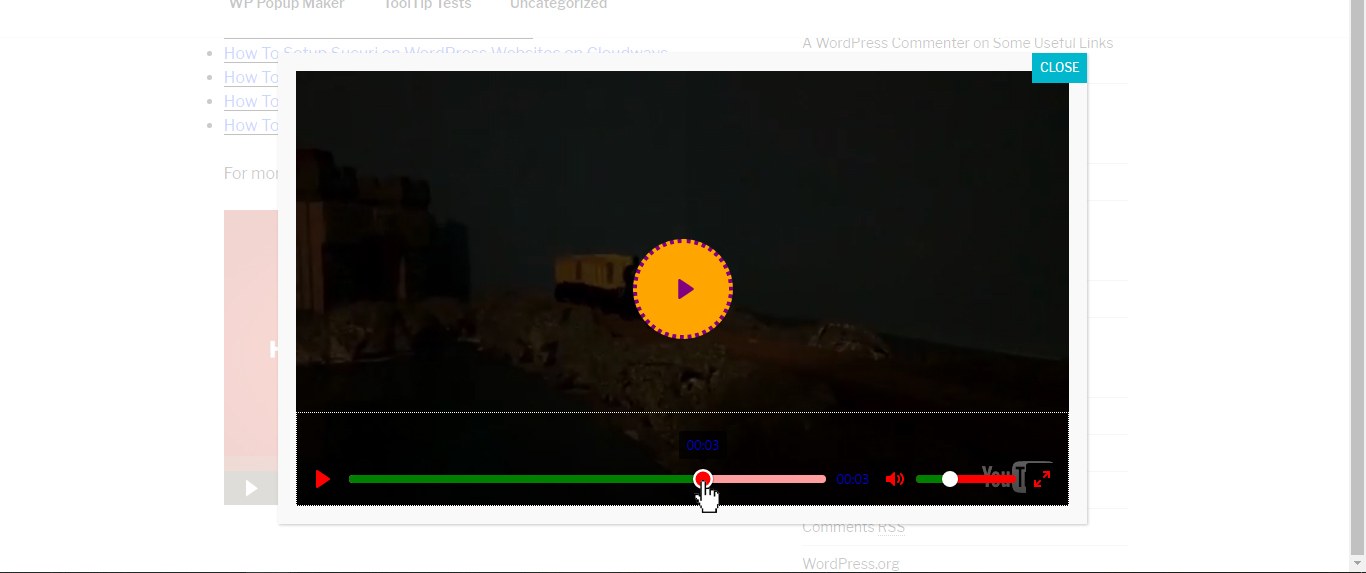
The style sheet includes inline documentation to follow along with changes to the player.
View the source on GitHub.
Version 1.0+ Stylesheet #
The full CSS stylesheet for the Videos plugin extension version 1.0+. There is no inline documentation included. It is suitable for advanced users who know their way around CSS.
View the source on GitHub.


