Image Gallery Example #
For this example, we’ll show you how you can pass parameters based on the link a visitor clicked, then render the link inside a popup.
In this case, let’s say the user is viewing a gallery, and you want the image that’s clicked dynamically displayed inside the popup.
Setup Your Gallery #
First, set up your image gallery. You can use the default WordPress Gallery capability or set up an image grid yourself. Either method will suffice.
Target Each Image Link #
As always with Remote Content, target each image link so that the images will trigger the popup when clicked. Do this using the Extra CSS Selector field in the Click Open trigger as shown in our Setting Up a Remote Content Popup document.
Getting and Passing the Image Link Parameter JavaScript #
Once the link(s) are set in the page or post content, the dynamic code setup process stays the same as in Remote Content AJAX Type Introduction. However, our code is just a bit different to get the image link. We’ve also applied a wrapper to the code so that we’re able to implement it in the WordPress Admin using a plugin like Simple Custom CSS/JS.
/*
Replace all references to the Popup Maker ID number used below with the ID number
for your popup. From the WP Admin, go to 'Popup Maker' -> 'All Popups' -> 'CSS Classes (column)'
to find the ID number assigned to your popup by the plugin.
 */
(function ($) {
    $(document)
        .ready(function () {

            $('#popmake-449')
                .on('popmakeRcBeforeAjax', function () {

                    jQuery.fn.popmake.rc_user_args[449] = {
                        img_src: jQuery(jQuery.fn.popmake.last_open_trigger).attr('href')
                    };

                });

        });
}(jQuery));
View the source on GitHub.
PHP #
Now that we have the code that gathers and passes the image link, we can use a callable PHP function (or method) to render the image inside the popup.
You can add the PHP code snippet to your child theme’s functions.php file or with a third-party plugin such as My Custom Functions.
<?php
/**
 *  Render image source HTML dynamically via AJAX.
 *  Note: Change the function prefix ( 'popmake_449_' ) to reference the
 *  popup ID used on your site.
 *
 * @since      1.0.0
 *
 * @return void
 */
function popmake_449_remote_content_ajax() {
	echo '<img src="' . ( isset( $_REQUEST['img_src'] ) ? $_REQUEST['img_src'] : '' ) . '" />';
}
View the source on GitHub.
Adding the Function Name to Remote Content #
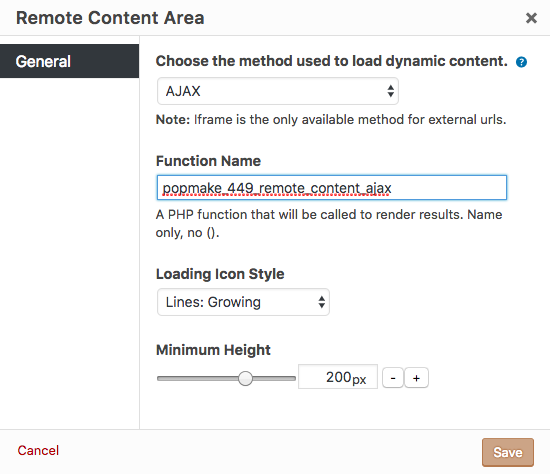
Now that all of the code is implemented, select the ‘AJAX’ load method, and add the name of the function or method to the Remote Content Area box. Save the shortcode settings, and select Update in the Publish metabox of the Popup Editor to save the changes.