









Overview #
This guide shows you where to find the advanced popup settings:
- Disable Automatic Popup Display After Non-AJAX Form Submission
- Disable Accessibility Features
Disable Automatic Popup Display After Non-AJAX Form Submission #
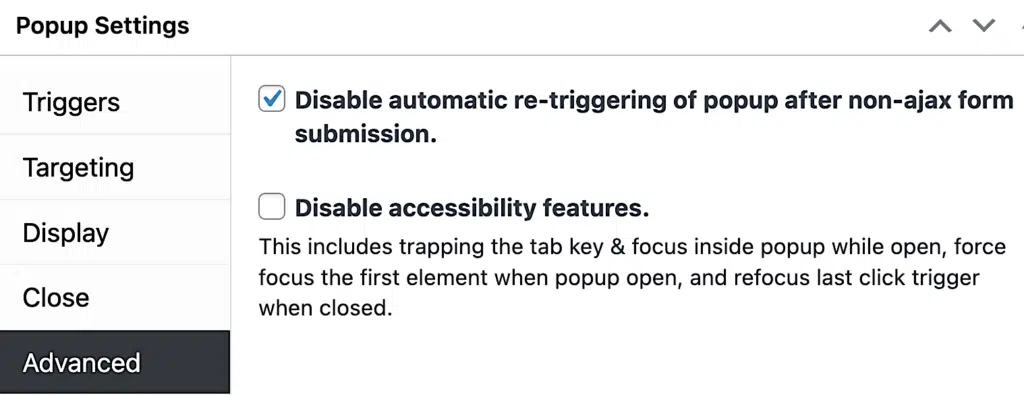
If the form in your popup doesn’t use AJAX (asynchronous JavaScript and XML), your popup might re-display after you submit the form. If you don’t want the popup to open again after form submission, go to Popup Settings > Advanced.
Click the Disable automatic re-triggering … non-ajax form submission checkbox.
Related article: Extending Integrated Forms – Post Success Actions
An alternative to non-AJAX enabled forms is to use a WordPress AJAX-enabled form plugin that integrates with Popup Maker. See the following:
Related article: Popup Maker Integration with WordPress Form Builder Plugins
Disable Accessibility Features #
Visually impaired visitors can use the tab key on their keyboard to navigate a web page link-by-link moving from top to bottom. The tab focus is designed to work on links, form input fields, and buttons inside a popup.
There is a specific popup setup when this tab focus did not work. That use case is now fixed in Popup Maker.
Select this feature whenever the following popup settings are set up in the Popup Settings box:
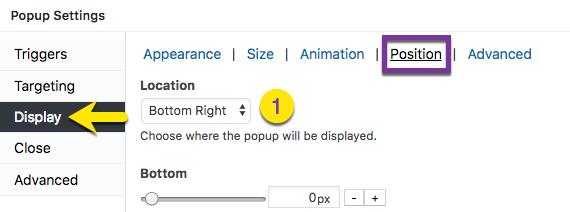
1) Location: Bottom Right (see Popup Settings > Display > Position); and

2) Disable Overlay: Checked (see Popup Settings > Display > Advanced).

3) Click the Disable accessibility features checkbox (see Popup Settings > Advanced).


