Brand Assets

Thanks for your interest in affiliating with Popup Maker

Below are a few guidelines for using Popup Maker’s brand resources, please take a moment to familiarize yourself with them. You can download individual assets in each section, or you can download everything all at once below.

Download All Assets

Our Name is Popup Maker

Popup Maker is two words. Always capitalize the P and the M.

Brand Name

PopupMaker

Not like this.

popup maker

Not like this.

POPUP MAKER

Not like this.

popupmaker

Not like this.

Popup Maker Colors

These are Popup Maker’s brand colors – copy the color codes below.

Brand Colors

Primary

#1dbe61

Light

#21db6f

Base

#1dbe61

Popup Maker Logo

These are Popup Maker’s marks & logos – copy or download in PNG/SVG format.

Logos & Marks

Not yet an affiliate?

Become an Affiliate
Earn commission when you recommend Popup Maker to your friends, fans & clients.
Sign Up

Popup Maker Historical Branding

These are Popup Maker’s past marks, logos & colors. Here for fun and archives.

Historical Marks, Logos & Colors
Popup Maker Logo - Archived
Popup Maker - Mark - Archived

Primary

#9ab927

Light

#a8cb29

Base

#2d2d2d

Gray 1

#626262

Gray 2

#cacaca

Gray 3

#dfdfdf
View Categories

I Don’t See the Trigger a Popup Option in Appearance > Menus

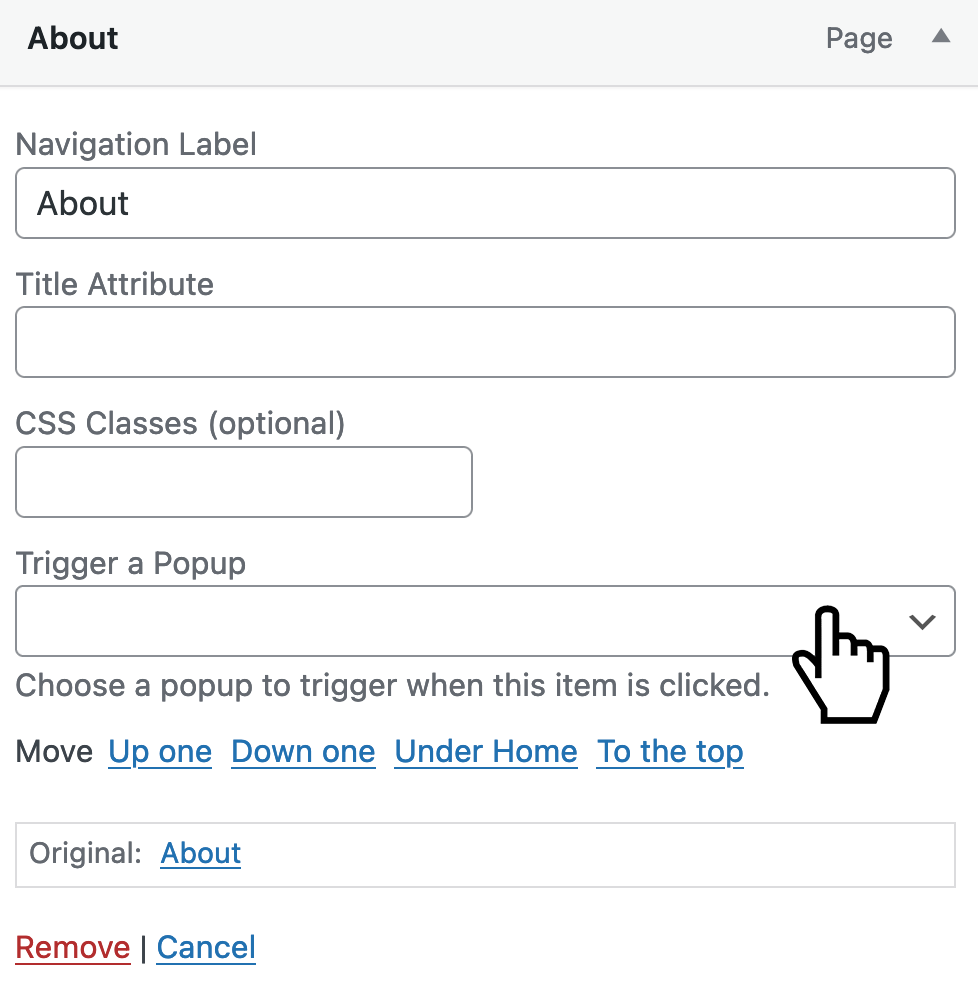
Popup Maker adds a Trigger a Popup option in the WordPress menu editor (Appearance > Menus). That option lets you launch a popup when you click a menu item.

Here’s what that option is supposed to look like.

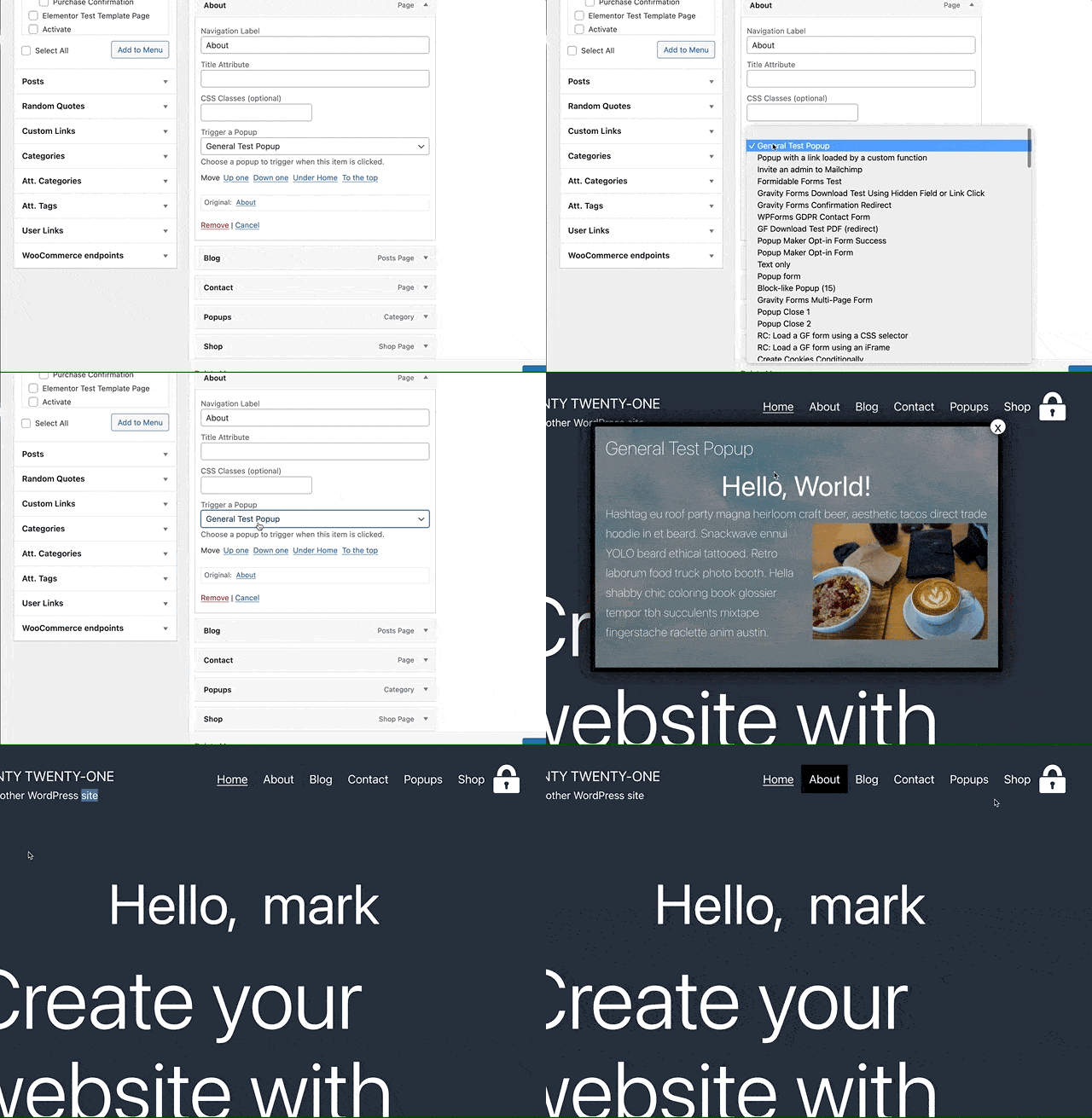
Here’s that menu trigger in action. The demo below shows us assigning a popup named General Test Popup to the menu item for the About page.

If you don’t see the Trigger a Popup setting on your site, then either:

  • your theme or
  • one of your plugins 

could be accidentally blocking the option from showing.

Don’t worry. We can help work with your theme’s or plugin’s development team to get you up and running. Let’s get started.

TL;DR #

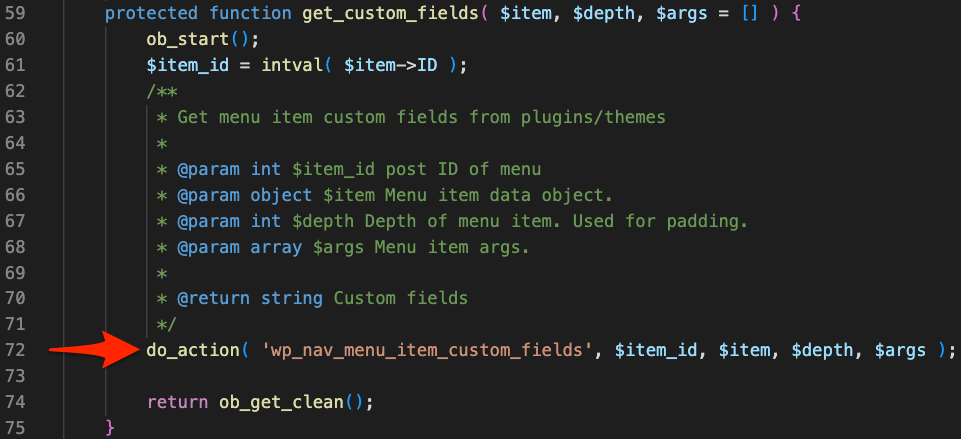
After a theme or plugin adds its custom menu settings it must use the wp_nav_menu_item_custom_fields action hook in its Walker_Nav_Menu_Edit class so all other custom fields display too.

How do themes or plugins unintentionally block Popup Maker’s menu option? #

Before WordPress 5.4 theme and plugin developers added custom settings to Appearance > Menus by replacing WordPress’s core Walker_Nav_Menu_Edit PHP class

But there’s a gotcha. There can be only one Walker_Nav_menu_Edit class, and the last version of the class (either from WordPress, a theme, or a plugin) wins. I.e., that’s the version you’ll see working in Appearance > Menus. If the “winner” didn’t account for other versions trying to show their menu options, then you’ll only see the winner’s menu options.

Example Scenario #

Here’s a scenario.

  1. You install  Plugin X
  2. Plugin X needs to add a menu setting called SETTING X
  3. Plugin X replaces WordPress’s core Walker_Nav_Menu_Edit with its own version. 
  4. Plugin X doesn’t realize your theme, and other plugins also add their custom menu settings. 
  5. When you edit a menu item under  Appearance > Menus, you can see SETTING X just fine. 
  6. But now, the Trigger a Popup option you had before is gone.

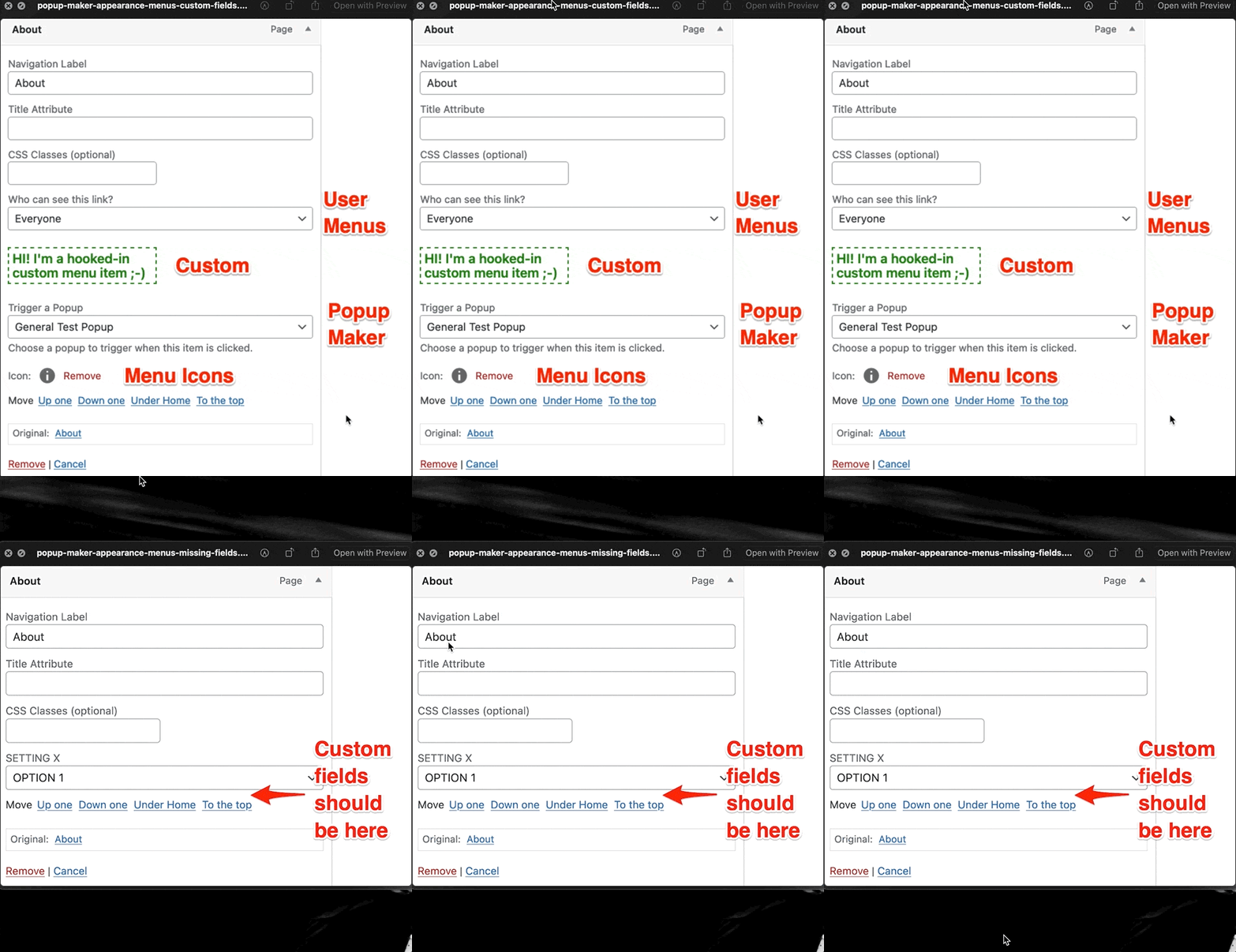
Here’s a before and after visual of our Plugin X scenario #

Before Plugin X: We have custom fields from the User Menus, Popup Maker, and Menu Icons plugins and 1 custom field we wrote ourselves.

After Plugin X: We see only SETTING X. The other custom menu fields are gone.

A Quick Test #

Change your site’s theme to a default WordPress theme like Twenty Twenty-One. If you see the Trigger a Popup menu field now, then it’s confirmed. Your theme needs to support custom menu fields from plugins!

If you still don’t see the Trigger a Popup setting, you’ll need to turn off your plugins 1-by-1 to figure out which plugin isn’t playing nice.

Pro Tips #

If you need to check for which plugin is causing the issue, try first turning off (1-by-1) the plugins that add menu fields.

What is a hook anyway? Find out what a WordPress hook is.

How to help your theme or plugin author fix the problem #

Follow these instructions so your theme or plugin developer can add support for all custom menu fields.

  1. Contact the developer of the theme or plugin that’s not displaying Popup Maker’s Trigger a Popup menu option. See our request email example below.
  2. Let them know your Trigger a Popup menu option isn’t displaying where it should be.
  3. Ask them to use the wp_nav_menu_item_custom_fields action hook in their copy (or child class) of the Walker_Nav_Menu or Walker_Nav_Menu_Edit class.
  4. Share this article (you’re reading) with your developer, so they get all the details.

Example request email #

Here’s an email example you can use to reach out to your theme or plugin developer. Feel free to CC support [at] 5fb604e7-99fd-4dcb-a5ef-268749498baa.express.conves.io.

Subject: Please use the wp_nav_menu_item_custom_fields action hook

Hi team!

We want to use Popup Maker to display a popup when we click a menu item. But, Popup Maker’s Trigger a Popup menu option disappears after we install your [theme | plugin].

Can you please use the wp_nav_menu_item_custom_fields action hook in your copy (or child class) of the Walker_Nav_Menu or Walker_Nav_Menu_Edit class.

For more details, check out this article that describes the issue and how to fix it.

Let us know if you have any questions.

Thanks so much for your support 🙂

Code Examples #

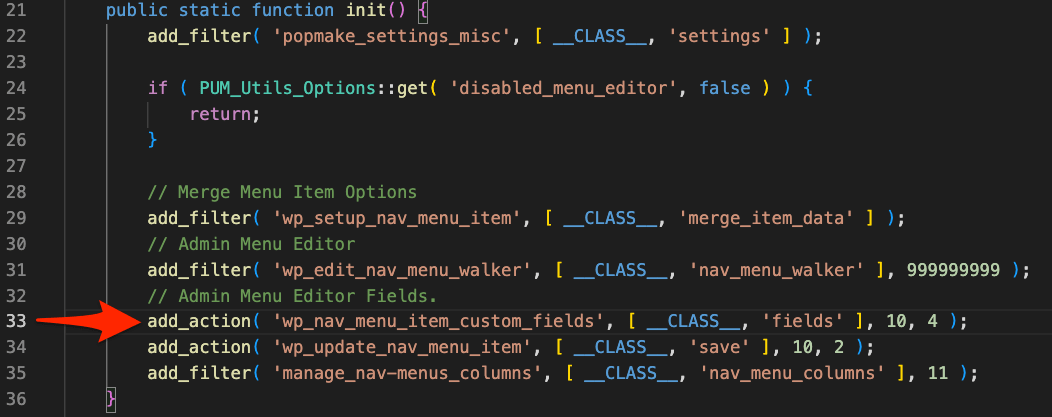
Here’s a list of plugins we know add menu options correctly using the  wp_nav_menu_item_custom_fields action hook.

  • Advanced Custom Fields (ACF)
  • Menu Icons
  • Popup Maker
  • User Menus
  • WP Fusion Lite

You can look up and view the source code for each plugin in the WordPress plugin directory.

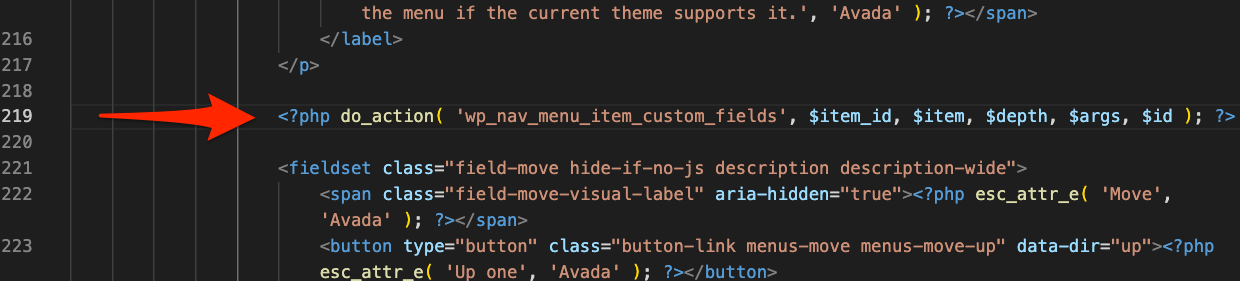
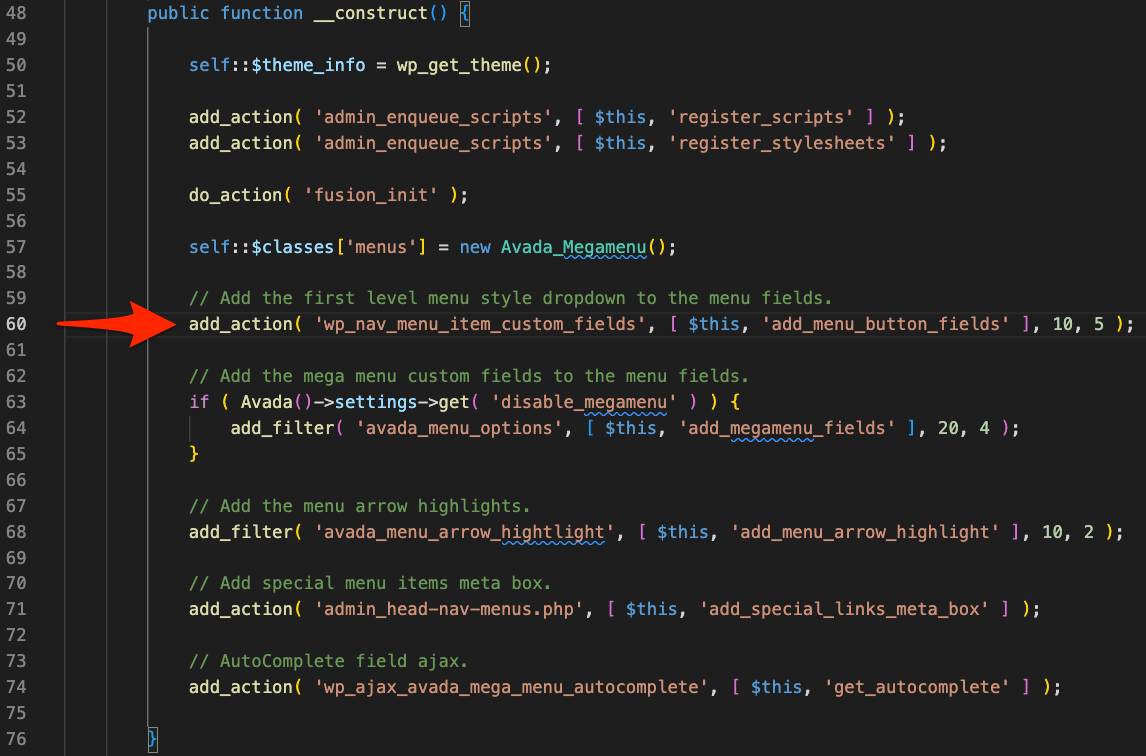
For a quick reference here are code examples of how Popup Maker and the Avada theme (no affiliation) use the  wp_nav_menu_item_custom_fields action hook.

Visit the source code on GitHub.

Visit the source code on GitHub.

Avada’s child class of Walker_Nav_Menu #

Avada’s call to add its custom menu options #

Leave the first comment

This site uses Akismet to reduce spam. Learn how your comment data is processed.