







Brand Assets

Thanks for your interest in affiliating with Popup Maker

Below are a few guidelines for using Popup Maker’s brand resources, please take a moment to familiarize yourself with them. You can download individual assets in each section, or you can download everything all at once below.

Download All Assets

Our Name is Popup Maker

Popup Maker is two words. Always capitalize the P and the M.

Brand Name

PopupMaker

Not like this.

popup maker

Not like this.

POPUP MAKER

Not like this.

popupmaker

Not like this.

Popup Maker Colors

These are Popup Maker’s brand colors – copy the color codes below.

Brand Colors

Primary

#1dbe61

Light

#21db6f

Base

#1dbe61

Popup Maker Logo

These are Popup Maker’s marks & logos – copy or download in PNG/SVG format.

Logos & Marks

Not yet an affiliate?

Become an Affiliate
Earn commission when you recommend Popup Maker to your friends, fans & clients.
Sign Up

Popup Maker Historical Branding

These are Popup Maker’s past marks, logos & colors. Here for fun and archives.

Historical Marks, Logos & Colors
Popup Maker Logo - Archived
Popup Maker - Mark - Archived

Primary

#9ab927

Light

#a8cb29

Base

#2d2d2d

Gray 1

#626262

Gray 2

#cacaca

Gray 3

#dfdfdf
View Categories

Why Is My Responsive Popup Taller Than the Screen On Mobile Devices?

Table of Contents

Description #

Your popup is set to ‘Responsive Sizes’ under the ‘Display Settings’ pane. It displays well on a desktop screen, yet on small-size screens appears taller than the screen. This can eliminate access to the popup ’Close’ button in the top-right corner, and lead you to think the popup is non-responsive on mobile devices. 

Cause #

Your popup’s content (the part we have no control over) is taller than a small screen-size. To adjust, the popup container expands vertically around the content. 
Your choice of popup anchor position affects the placement of the popup container on screen. On mobile-sized screens, a popup anchored to ‘Middle Center’ will extend lengthy content above and below the screen.

Solution #
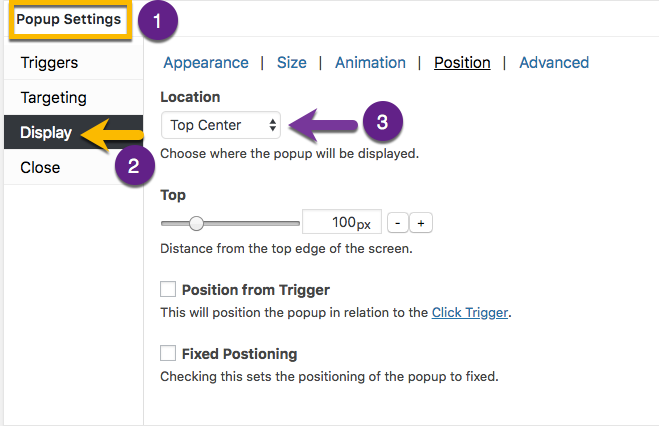
In the Popup Editor: 

1) go to the ‘Popup Settings’ box, and

2) select the ‘Display’ option tab.  Select the ‘Position’ option category, and 

3) change the ‘Location’ option from ‘Middle Center’ to ‘Top Center’.

Now the top of the popup container will be visible on a small screen size. The popup container will move up and down within the browser window, which allows all the popup content to be seen. 

Leave the first comment

This site uses Akismet to reduce spam. Learn how your comment data is processed.