









Overview #
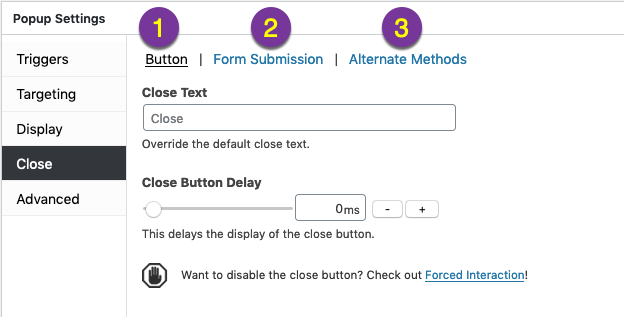
The Close option within the Editor’s Popup Settings box contains 3 option categories.
- Button
- Form Submission
- Alternative Methods
This article briefly describes each of the properties assigned within each option category.
Category: Button #

Override a popup’s close button text, and delay the appearance of the popup close button.
Note: You can choose and style Popup Close Settings in the Popup Themes Editor. After you make a new popup theme or edit an existing one, go back to (edit) your popup and pick that theme under Popup Settings > Display > Appearance.
Property Description #
Close Text — Override the value set by the assigned popup theme’s Close Button Text.
For example, a value of ‘CLOSE’ set at Popup Maker >> Popup Themes >> Close >> Close Button Text could be changed to ‘X’ for a single popup. To maintain a consistent style across all popups, use the Close Button Text set in the Popup Theme Settings box.
Default: Value set by the Popup Theme at Popup Settings >> Display >> Appearance.
To entirely remove the Close button from a popup so that visitors must interact with the contents of a popup, install the Forced Interaction extension to Popup Maker.
Default: 0 ms (milliseconds); close button appears at the same time as the popup.
Delay range: 0 – 3000 ms (0 – 3 seconds).
Category: Form Submission #
Property Description #
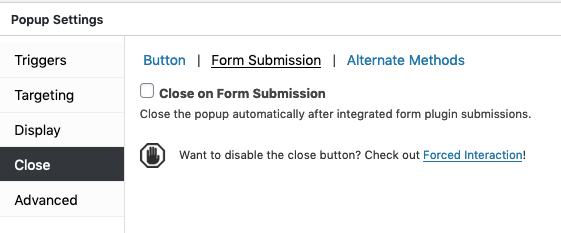
Close on Form Submission (checkbox) — Automatically close a popup after a form placed inside it is submitted. This feature is available when using the Popup Maker Subscription Form or a WordPress form plugin that is supported by Popup Maker.
Related article: Trigger: Form Submission
Closing a popup form after a user clicks the ‘Submit’ button implies their action caused an effect. Many form plugins also allow one to display a confirmation message after a form is submitted and disappears from view.
Default: unchecked (off); the popup form will remain visible after a form is submitted.
Category: Alternate Methods #
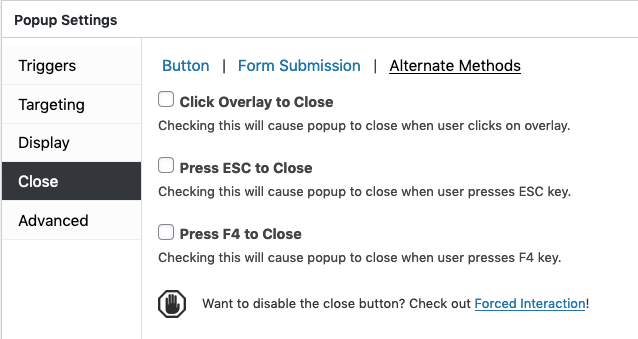
By default, a popup is closed by selecting the Close button displayed in the popup container. Several alternative methods allow visitors to close a popup by clicking on the popup overlay layer, or using their keyboard. By default, each of the following methods is not enabled (turned ‘off’).
Property Description #
Click Overlay to Close (checkbox) — Allow visitors to close a popup when the popup overlay layer is clicked or touched. The overlay layer is the area outside the popup container.
Activating this feature provides visitors a larger area to close a popup. The expanded close feature will even work when the overlay layer is disabled.
Default: unchecked (off).
Related article: The ‘Display’ option settings includes a ‘Disable Overlay’ option. See Popup Settings >> Display >> Advanced to turn off the overlay layer.
Press ESC to Close (checkbox) — Allow visitors to close a popup by using their keyboard Escape (ESC) key.
Default: unchecked (off).
Press F4 to Close (checkbox) — Allows visitors to close a popup by pressing their keyboard.
In the Windows operating system, the keyboard F4 function key allows users to close application windows and programs. When enabled, this feature extends that capability to all plugin users, regardless of their operating system.
Default: unchecked (off).


