









Overview #
PUM version 1.9 adds a simplified API (application programming interface) that allows WordPress form builder plugins to integrate with Popup Maker.
A shortcode from a supported form builder plugin can be added to the popup editor and rendered inside a popup. A Form Submission trigger can open a thank you popup after successfully submitted a form. A Form Submission cookie manages when to redisplay the popup after successful form submission.
The Form Submission cookie can be used whenever a supported form plugin is added to a popup.
Form Plugins Supported by Popup Maker #
Current native forms and form plugins supported by Popup Maker include:
- Popup Maker’s Subscription Form shortcode
- Ninja Forms
- Gravity Forms
- Formidable Forms
- Contact Form 7
- WPForms
- Caldera Forms
- MailChimp for WordPress (MC4WP)
- WS Form
- Fluent Forms
Popup Maker will add integration support for more WordPress form plugins in future plugin releases. Please refer back to this document for the current list of form plugins that integrate with Popup Maker.
Triggers and Cookies #
Form Submission Trigger #
Triggers are events that occur in the browser based on visitor behavior. Forms supported by Popup Maker allows setting a Form Submission trigger in order to open a popup after a form has been submitted. See the following articles for an introduction to Popup Maker triggers and their use.
Related article: ‘Triggers’ option settings
Related article: Trigger: Form Submission
Form Submission Cookie #
Cookies control the repeat display of popups in the browser. See the following article for an introduction to Popup Maker cookies and their use.
Related article: ‘Cookies’ option settings
Close Popup Form on Form Submission #
By default, a form that integrates with Popup Maker will not close when the form is submitted. To close a popup on form submission, open the popup editor and go to:
Popup Settings box >> Close tab >> Form Submission category.
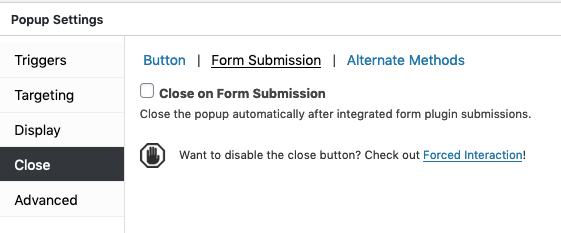
Select the checkbox ‘Close on Form Submission’ to close the form when the form submit button is clicked.
Related article: ‘Close’ option settings // See: Category: Form Submission.
Confirmation Messages Following Form Submission #
Popup Maker does not manage confirmation or success messages following successful form submission. Those message are set and managed from the plugin admin of whichever form plugin is used.


