









Overview #
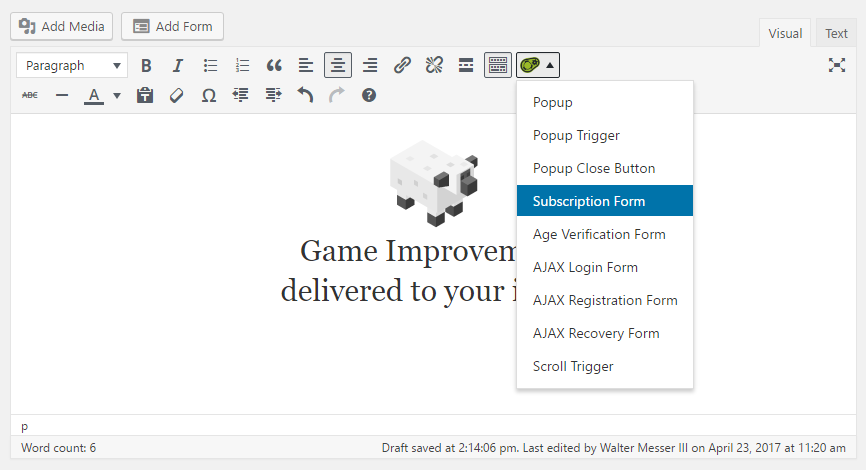
Popup Maker registers a Subscription Form shortcode with WordPress ([pum_sub_form]) that is available to all plugin users. The MailChimp Integration plugin extension adds features to this shortcode specific to the use of MailChimp.
The MailChimp plugin uses the Popup Maker shortcode user interface (UI) to allow for easier shortcode editing and live form previews in the Popup Editor. Shortcode attributes can also be viewed directly on the Editor Text tab to inspect, add, edit, or delete settings.
This article describe the shortcode options added by the MailChimp Integration plugin to the Subscription Form box. The related article link below describes how to set up a subscription form popup with the Popup Maker shortcode button.
Related article: Shortcode: Subscription Form
Shortcode Features Added in the Subscription Form Settings #
General #
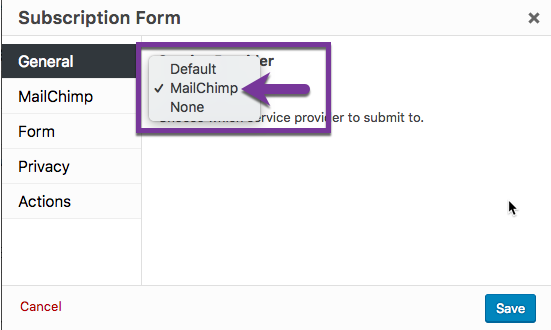
Service Provider ( menu-option ) Plugin default: Default. Adds a menu option to set the newsletter service provider to MailChimp. To link the subscription form to a MailChimp account, change the value from ‘Default’ to MailChimp.
Shortcode attributes (visible from the editor Text tab):
- The shortcode attribute for the newsletter service provider.
- The plugin default option is ‘Default’ which does not display the attribute (attribute is set to NULL).
[pum_sub_form provider="no attribute | mailchimp | none"]
MailChimp > General #
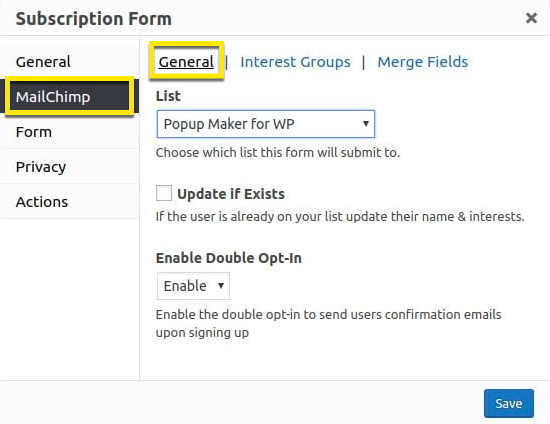
List ( menu-option ) Link the subscription form to a specific MailChimp list.
Shortcode attributes (visible from the editor Text tab):
- The shortcode attribute for the newsletter list ID. The list ID attribute is passed from the MailChimp API key.
[pum_sub_form list_id="{alpha_numeric_string}"]
Update if Exists (checkbox) Plugin default: unchecked. When checked, allow existing members to update their list information via the popup subscription form.
Shortcode attributes (visible from the editor Text tab):
The shortcode attribute to update the name and interests for a list member. value = ‘unchecked’ (plugin default) no attribute displayed
[pum_sub_form update_if_exists]
Enable Double Opt-in ( menu-option ) Plugin default: ‘disable’ (off). Set or disable double opt-in for new list subscribers.
Shortcode attributes (visible from the editor Text tab):
The shortcode attribute to set double opt-in for new list subscribers. The plugin default is the first value shown below.
[pum_sub_form double_opt_in="disable | enable"]
MailChimp > Interest Groups #
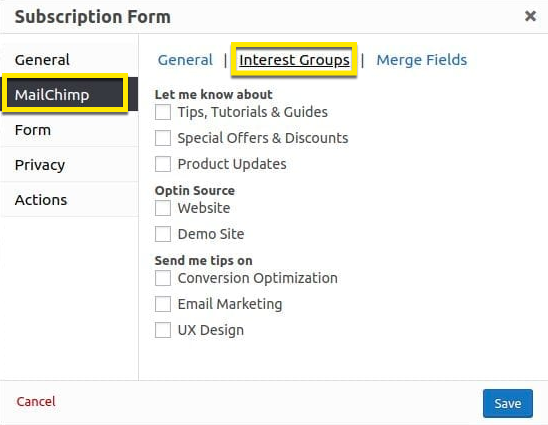
Display interest groups from a MailChimp list to add to a Popup Maker subscription form.
Shortcode attributes (visible from the editor Text tab):
The shortcode attribute for MailChimp list interest groups. The plugin default value is the first value shown below.
If the list contains no interest groups, or no interest groups are selected, no attribute displayed
Each group number is an alphanumeric string of characters.
[pum_sub_form fields="{merge_id_1}, {merge_id_2}, ..{merge_id_n}"]
Actions > MailChimp #
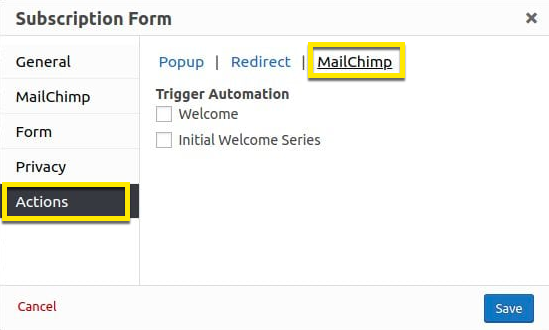
Adds a MailChimp option category to the Actions option tab. Select the MailChimp automation events to trigger when the form popup is submitted.
Related article: About Automation ( MailChimp documentation ).
Shortcode attributes (visible from the editor Text tab):
The shortcode attributes for the MailChimp automation trigger.
If no automations are set for this list, or no automations are selected no attribute displayed.
[pum_sub_form automations automation_emails]
Refer to the documentation article Shortcode: Subscription Form for each of the shortcode’s remaining option tab settings:
- Form,
- Privacy, and
- Actions


